

Dual-Axle Trailer TPMS: Independent Axle Pressure Setup for Uneven Loads
Choose a TPMS with independent axle pressure programming when monitoring dual-axle trailers carrying uneven cargo loads.
Dual-axle travel trailers, fifth wheels and toy haulers frequently carry uneven weight distribution between axles due to freshwater tanks, rear garage cargo or hitch geometry. A tire pressure monitoring system with independent axle baseline programming allows drivers to configure separate low-pressure and high-pressure alert thresholds for the tow vehicle, front trailer axle and rear trailer axle on a single monitor. The GRUNDIG 550S supports independent axle pressure calibration across 6 to 36 tire positions up to 200 PSI, making it suitable for mixed tow-vehicle and trailer baselines alongside multi-axle systems such as the TireMinder i10 and TST 507.
Always establish cold tire pressure according to individual axle weight scale tickets and tire manufacturer load inflation tables. A TPMS reports pressure and temperature; it does not level trailer loads or increase axle weight ratings.
Why dual-axle setups need axle-specific pressure baselines
Dual-axle trailers rarely distribute weight equally across all four tires:
| Load Factor | Impact on Axle Pressures | TPMS Requirement |
|---|---|---|
| Tongue weight and hitch angle | Unlevel ball mounts shift 15–25% more dynamic weight onto the front or rear axle | Independent axle baseline programming rather than global rig thresholds |
| Rear garage and tank loading | Full freshwater or blackwater tanks create unequal fore-and-aft weight splits | Customizable low-pressure alarms (e.g. 65 PSI front axle, 80 PSI rear axle) |
| Mixed tow vehicle + trailer tires | Tow trucks typically run 35–45 PSI while trailer ST tires require 65–80 PSI | Multi-section display supporting separate tow vehicle and multi-trailer banks |
| Highway heat expansion | Heavily loaded rear trailer tires experience faster thermal rise on hot pavement | Real-time temperature alerts to detect dragging brakes or failing hub bearings |
The Tire Industry Association (TIA) commercial guidelines note that running identical cold inflation on unevenly loaded axles causes premature center-tread wear on lighter tires and dangerous sidewall heat buildup on heavier tires. Programmable baseline thresholds alert drivers to true slow leaks without triggering false alarms on lighter axles.
Compare three multi-axle independent baseline TPMS options
Specifications verified from manufacturer technical documentation on October 29, 2026. This comparison provides technical specifications for purchasing evaluation.
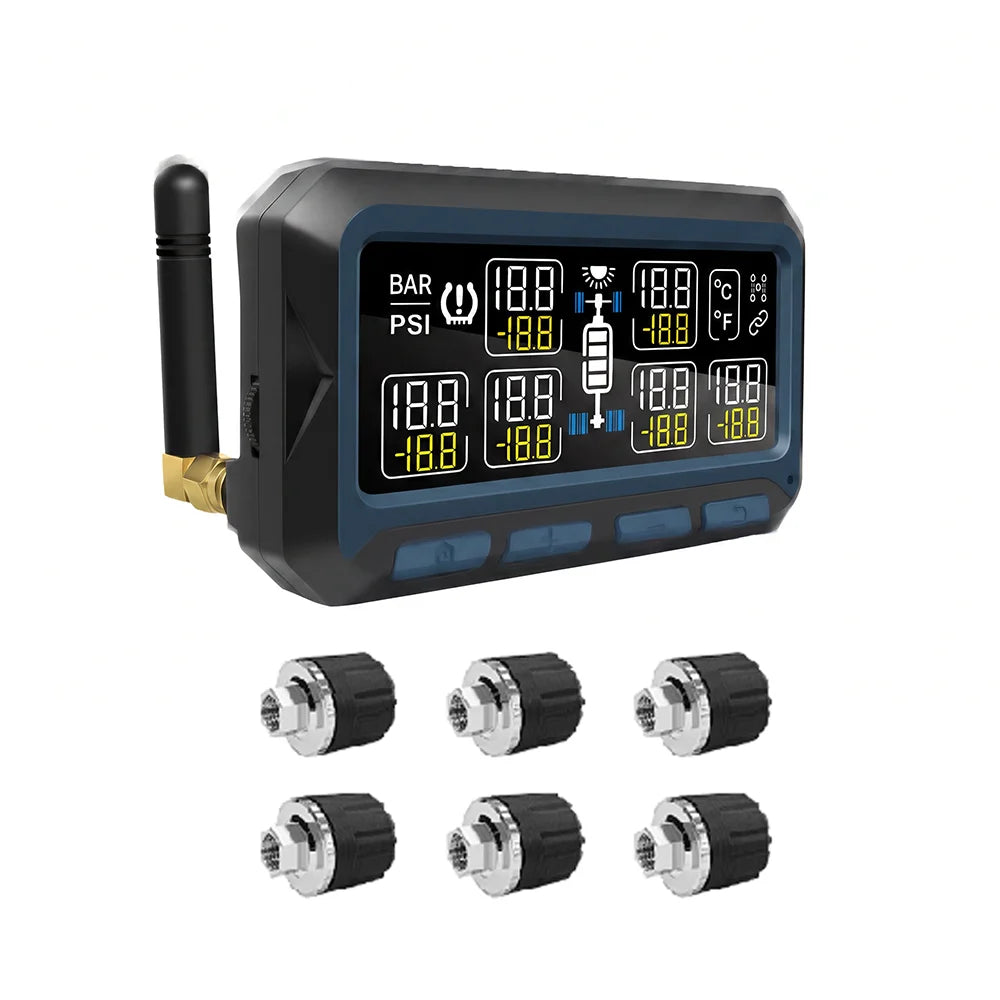
| Feature / Specification | GRUNDIG 550S | TireMinder i10 | TST 507 |
|---|---|---|---|
| Monitored tire positions | 6 to 36 positions | Up to 20 tires (10 per screen) | Up to 38 tires (4 trailers) |
| Maximum pressure ceiling | 0–200 PSI | 0–199 PSI | 0–218 PSI |
| Axle-specific baseline setup | Independent baseline per axle | Axle-by-axle pressure programming | Axle-by-axle baseline programming |
| Display and power | 5.0-inch HD display + Solar / USB-C | 3.15-inch color display + USB | Color widescreen + Micro-USB |
| Sensor ingress protection | IP67 waterproof & dustproof | Brass waterproof external sensors | Brass waterproof external sensors |
| Alert modes | Rapid leak, high/low PSI, high temp | Rapid leak, high/low PSI, high temp | Rapid leak, high/low PSI, high temp |
Sources: GRUNDIG 550S product guide, TireMinder i10 technical manual, and TST 507 multi-axle guide.
How to program axle-specific alert thresholds
Follow this step-by-step setup sequence when calibrating multi-axle baseline pressures:
- Weigh your loaded rig on a segmented scale (such as a CAT scale) to determine exact axle weights for the tow vehicle, front trailer axle and rear trailer axle.
- Refer to your tire manufacturer's load-inflation table to determine the required cold inflation pressure for each axle's measured load.
- Inflate all tires to their specified cold pressures before daytime driving.
- On your TPMS display, enter parameter setting mode and select Axle 1 (tow vehicle front), Axle 2 (tow vehicle rear), Axle 3 (trailer front) and Axle 4 (trailer rear).
- Set the target baseline cold PSI for each axle independently. The monitor automatically establishes low-pressure warnings at 12–15% below baseline and high-pressure warnings at 20–25% above baseline.
- Set the high-temperature threshold (recommended 158°F / 70°C) across all positions to catch overheated brake drums or hub bearings early.
Frequently asked questions
Can I set different baseline pressures for front and rear trailer axles on the GRUNDIG 550S?
Yes. The GRUNDIG 550S features independent axle programming, allowing you to calibrate distinct target cold pressures for the front trailer axle, rear trailer axle, and tow vehicle axles on one screen.
Why do trailer tires on the same side show different pressures while towing?
Unequal cargo weight distribution, sun exposure on one side of the rig, or crown slope in the highway pavement creates different load and heat dynamics across dual axles, causing normal thermal pressure variations of 5 to 15 PSI.
What should I do if only one tire triggers a high-temperature warning?
Pull over safely at the next exit and inspect the hub assembly. An isolated high-temperature reading without low pressure typically indicates a dragging brake caliper, failing wheel bearing, or tight brake shoe rather than road friction.
Check your multi-axle TPMS setup
Match your trailer axle count, maximum tire pressure rating and tow combination before selecting your sensor package.
Check GRUNDIG 550S Multi-Axle TPMS sensor packages and specifications