

You've bought a Grundig TPMS – congratulations! Now, how do you get it from the box to monitoring your tires correctly? Don't worry: external TPMS installation is one of the easiest DIY upgrades you can do. In this guide, we'll walk you through unboxing, sensor pairing, setting pressure/temperature alarms, mounting, and troubleshooting. You'll be on the road with full tire visibility in under 10 minutes.
📦 What's in the Box?
Your Grundig TPMS kit includes:
- 1x Monitor (display unit) with USB charging cable
- 4/6/8x External sensors (depending on kit) — up to 110 sensors on the heavy-duty 860
- Anti-theft nuts and small wrench
- User manual (also available online)
- Optional: Signal Repeater (if purchased)
Note: Internal sensor kits require professional installation – this guide covers external sensors (RV01, S04 Solar, and the heavy-duty 550S / S08 / D550 / 860 line).
🔧 Step-by-Step Installation
Plug the display into a USB charger (computer, 12V adapter, or wall outlet) for about 2 hours before first use. The S04 Solar and 550S also charge via sunlight – but initial charge via USB is recommended.
First, screw the anti-theft nut onto the valve stem (threads facing outward). Then screw the Grundig sensor onto the same valve stem, tightening until snug (but not over-tightened). Finally, use the small wrench to tighten the anti-theft nut against the sensor – this prevents theft. Repeat for all tires.
💡 Tip: Label each sensor with its wheel position (e.g., FL, FR, RL, RR, or inner/outer dual) using a marker before installing. On a dually, label the inner and outer rear tires separately so you always know which tire is alerting.
Press and hold the power button (usually top or side) for 3 seconds. The screen will light up. Place the monitor in your cab – on the dashboard or windshield mount (included in some kits).
Grundig systems auto-pair – simply drive above 15 mph for a few minutes, and sensors will register. If you need manual pairing:
- Enter menu (press "M" or "SET" button).
- Select "Pair Sensor" → choose wheel position.
- Deflate tire slightly (5 PSI) to trigger sensor transmission, or drive. The monitor will confirm pairing.
- Repeat for each wheel.
This is critical. Use the tire sidewall's "MAX PSI COLD" as a reference. Recommended settings:
- High pressure alarm: MAX COLD PSI + 15% (e.g., if cold max is 80 PSI, set high alarm to 92 PSI).
- Low pressure alarm: COLD PSI – 20% (or 10-15 PSI below recommended).
- High temperature alarm: 158°F (70°C).
To adjust: Navigate via menu buttons, select "Alarm Settings", use +/- to modify values. On the D550 and 860, you can also set independent alarm thresholds per axle — useful when your trailer's tires run a different pressure than your truck's.
Drive around the block. The display should show real-time pressure and temperature for each tire. If a sensor shows "--" or no data, drive a bit longer or re-pair. If issue persists, check battery or contact support.
📊 Recommended Alarm Thresholds by RV & Truck Type
| Vehicle Type | Recommended Cold PSI | Low Alarm (PSI) | High Alarm (PSI) | Temp Alarm (°F) |
|---|---|---|---|---|
| Class C Motorhome | 70 | 55 | 90 | 158 |
| Travel Trailer (Dual Axle) | 65 | 50 | 85 | 158 |
| Class A Diesel Pusher | 115 | 95 | 140 | 158 |
| Toy Hauler | 124 | 100 | 150 | 158 |
| Fifth Wheel | 100 | 80 | 130 | 158 |
| Dually Truck (6 wheels) | 110 | 90 | 130 | 158 |
| Tandem Dually Trailer | 110 | 90 | 130 | 158 |
| Heavy Truck (Load Range G/H) | 125 | 100 | 145 | 158 |
❗ Common Installation Mistakes & Fixes
- Sensor not detected: Drive above 15 mph for at least 2 minutes. If still no signal, remove sensor and reinstall – sometimes valve core needs a tiny bit of movement to wake sensor.
- False high-pressure alarm: Your high alarm threshold is set too low for hot running pressure. Increase high alarm by 10-15 PSI above cold max.
- Monitor won't turn on: Charge via USB for 30 minutes. The battery might be fully drained from storage.
- Intermittent signal on rear tires: Your rig may need a signal repeater (available for Grundig RV01, S04, 550S, S08, D550 and 860). Mount repeater near rear of trailer.
- Sensors leaking air: Ensure the rubber O-ring inside sensor is seated properly. Hand-tighten only – do not use tools on the sensor body.
🔁 Installing a Signal Repeater (if needed)
If your total rig length exceeds 35 feet or you have a metal-bodied trailer, add a Grundig repeater:
- Mount the repeater in the front storage compartment of your trailer (or near rear of tow vehicle).
- Plug it into a 12V cigarette lighter socket or hardwire to 12V power.
- No pairing required – the repeater automatically boosts all sensor signals to the cab monitor.
Long combinations and multi-trailer fleets can run multiple repeaters — the GRUNDIG 860 scales up to six boosters so even a 110-wheel road train keeps every sensor reporting.
🛠️ Maintenance & Battery Replacement
Grundig external sensors use CR1632 batteries. The display will show a low battery icon for a specific sensor. To replace:
- Unscrew the anti-theft nut using the small wrench.
- Unscrew the sensor from valve stem.
- Open the sensor case (twist or pry gently).
- Remove old CR1632 battery, insert new one (positive side up).
- Reassemble and reinstall sensor – no re-pairing needed.
⭐ Grundig TPMS Models – Quick Specs

GRUNDIG RV01
116 PSI | 5" HD Display | 40m Range | Repeater Ready

GRUNDIG S04 Solar
217 PSI | Solar + USB | 5" Display | Repeater Ready
🚛 Heavy-Duty TPMS for Trucks, Dually & Tandem Trailers
Running a dually truck, a tandem-axle trailer, or a commercial rig? These systems monitor 6 to 110 wheels at up to 217 PSI — the lineup that covers everything the RV kits don't, including the inner dual tires a standard system leaves unmonitored.
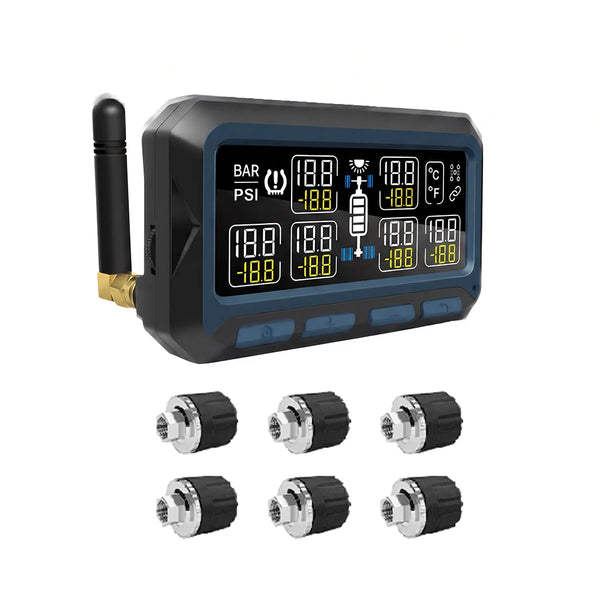
GRUNDIG 550S
200 PSI | Solar + USB | 6–36 Wheels | ±1.5 PSI | Infineon Chip

GRUNDIG S08
217 PSI | 8/10/12 Wheels | 5" HD | 40m Range | Anti-Theft

GRUNDIG D550
200 PSI | 6–40 Wheels | Independent Axle Alerts

GRUNDIG 860
200 PSI | 6–110 Wheels | 5" Touch | Multi-Trailer | GPS
📷 Already Have a TPMS? Complete the Setup with a Backup Camera
Your tires are now covered — but what's directly behind your truck or trailer is still a blind spot. A wireless solar backup camera is the natural next add-on for the same rigs you just fitted with sensors: it mounts with a neodymium magnet (no drilling, no wiring), charges by solar, and streams a full-color rear view to a 7-inch monitor. While the TPMS watches the tires, the camera watches the road.
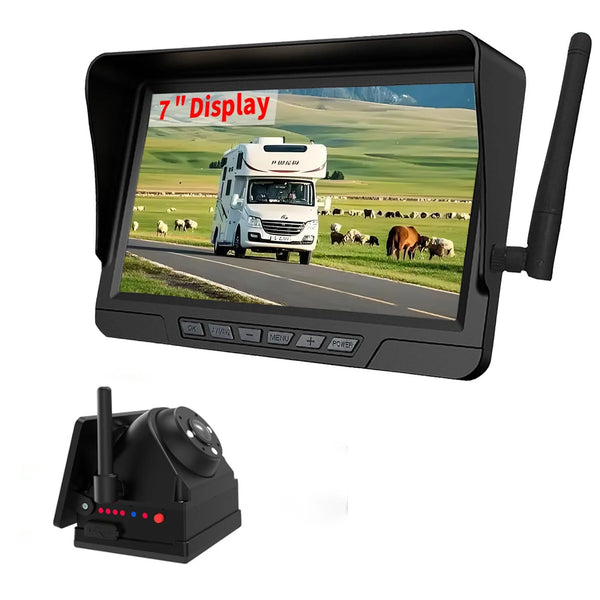
GRUNDIG Solar Wireless Backup Camera
7" 4-Channel Monitor | Solar + 19-Hour Battery | 330 ft Wireless | Full-Color Night Vision | Front & Rear Recording | IP67
❓ Installation FAQ
Do I need to remove sensors when inflating tires?
For standard external sensors, yes – you must unscrew them to add air. For convenience, consider Flow-Through sensors (available on request).
Can I install external sensors on rubber valve stems?
Yes, for RVs under 10,000 lbs. For heavy Toy Haulers, Class A, or dually trucks, upgrade to metal stems to prevent fatigue under higher pressures and loads.
How long does it take for sensors to show data?
After driving above 15 mph, new sensors appear within 30 seconds to 2 minutes.
My monitor shows wrong pressure – what to do?
Check pressure with a manual gauge. If difference >2 PSI, deflate and re-inflate tire to correct pressure, then drive to update.
Can I move sensors to another vehicle?
Yes – just unscrew them and reinstall on new vehicle. You may need to re-pair to the monitor.
How many sensors do I need for a dually truck and trailer?
Count every tire on the ground — a dually truck is 6, a tandem-axle trailer adds 4, and so on. Buy a system whose wheel capacity matches your total: the 550S covers 6–36, the D550 6–40, and the 860 up to 110 wheels.
🛠️ Get Your Grundig TPMS Today
Install in 10 minutes and enjoy peace of mind on every trip.
Shop TPMS → S04 Solar (Best Seller)🎥 Tires monitored — now see what's behind you. Add a wire-free solar backup camera in minutes.
Shop the Backup Camera →