

Backing a tandem or gooseneck trailer is one of the most stressful jobs behind the wheel. Your mirrors show you a slice of the side, your neck cannot see over the load, and the corner that matters most — directly behind the trailer — is a blind zone the length of a small car. A wireless backup camera puts that blind zone on a screen in the cab, and the modern solar-powered ones do it without a single wire, drill, or afternoon of installation.
This guide covers why a wire-free camera beats a wired one for trailers, how many cameras you actually need, and how to get one mounted and working in minutes. We make the camera we are about to describe, so we will keep it concrete about what it does and does not do.
Why Backing a Tandem or Gooseneck Trailer Is So Hard
A tandem-axle trailer does not pivot like a short utility trailer. It turns slower, resists correction, and keeps momentum in a direction you have to anticipate rather than react to. A gooseneck is even more demanding: the hitch sits in the truck bed, the trailer is long, and the geometry means a small steering input at the wheel becomes a large movement at the tail. Add a load that blocks your rear window and the result is a vehicle combination where the last ten feet are completely invisible.
That invisibility is where damage happens — a clipped fence post, a bumped dock, a scratched bumper. It is also where injuries happen, because the most dangerous person in a backing maneuver is the spotter standing in the blind zone waving at you. A camera does not replace a spotter, but it removes the guesswork that makes a spotter necessary in the first place.
Wired vs Wireless Backup Cameras: The Real Trade-Offs
Wired camera systems run a video cable from the camera at the back of the trailer all the way to the cab. On a car, that is a short run. On a 30-foot gooseneck trailer, that is a long cable routed under the chassis, through the frame, and into the truck — which means drilling, zip-ties, and a permanent installation you cannot easily move to a different trailer.
A wireless system replaces that cable with a radio signal. The trade-off used to be reliability: early wireless cameras dropped frames and interfered with other electronics. Modern 2.4 GHz digital wireless has mostly closed that gap, delivering a stable, low-latency feed at distances far longer than any trailer. For a trailer you might swap or reposition, wireless is the clear winner — no wiring, no drilling, and you can move the camera in seconds.
The Magnetic, Solar, Wire-Free Advantage (No Drilling, No Wiring)
The GRUNDIG solar backup camera combines three ideas that make installation almost a non-event: a neodymium magnetic mount, a solar panel with a 9,600 mAh battery, and a wireless link to a 7-inch monitor. The magnet holds the camera to any steel surface — a trailer frame rail, a gooseneck crossmember, or a truck bumper — and releases just as easily when you want to move it.
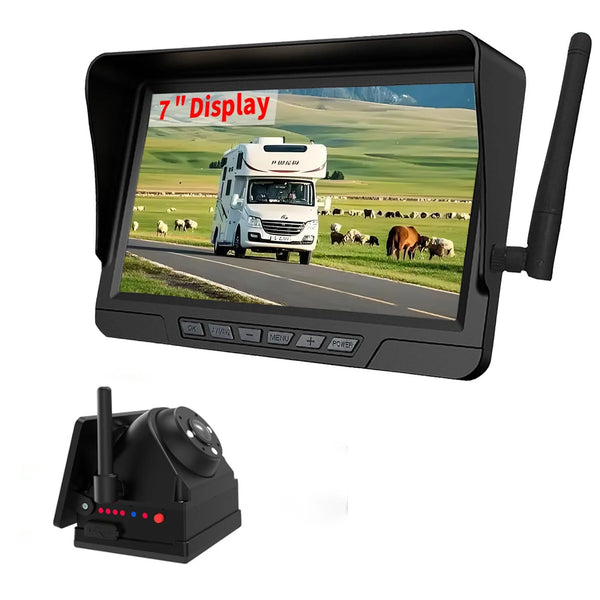
GRUNDIG Solar Wireless Backup Camera
Magnetic mount, solar + 19-hour battery, 7" 4-channel monitor, full-color night vision, front & rear loop recording, 330 ft wireless range, IP67.
View the Solar Wireless Backup Camera →Because the camera charges by sunlight and holds up to 19 hours per charge, there is no power wire to run to the trailer either. The monitor plugs into the truck's 12V outlet and the two talk over the air. That is the whole install: stick the camera on, plug in the monitor, done.
How Many Cameras Do You Need? 1, 2, 3, or 4
The number of cameras is not about the camera — it is about how you use the rig. The monitor supports up to four cameras on a split-screen view, so you only pay for the coverage you need.
- 1 camera — rear view only. Right for a single trailer or anyone who just wants backup assistance.
- 2 cameras — front + rear. The daily-driver setup: records the road ahead and behind at the same time.
- 3 cameras — rear + two blind spots. Built for long trailers and 5th wheels where lane changes are the worry.
- 4 cameras — full 360° coverage on a 4-way split. Maximum visibility for a large RV or long gooseneck.
How Many Cameras Do You Need?
Pick the setup that sounds like your rig, then tap "Show my count".
Which best describes your towing?
Full-Color Night Vision & Front-Rear Dual Recording
Two features separate a "backup cam" from a camera you can actually rely on day and night. The first is the lens: an F2.0 large-aperture lens with starlight sensor technology keeps the picture in full color even in low light, rather than dropping to grainy infrared black-and-white. The second is a 140° wide-angle field of view, which reduces the blind spots at the edges of the frame.
The recording side matters too. Front and rear dual DVR loop recording means the system constantly records the road ahead and behind, automatically overwriting the oldest footage when the card fills. There is nothing to clear and no button to remember — if something happens, the video is there.
2.4GHz Digital Wireless: 330 ft Range Explained
The reason a wireless camera works on a long gooseneck trailer is the transmission. The GRUNDIG camera uses a 2.4 GHz digital signal with a line-of-sight range up to 330 feet — roughly three times the length of even a large trailer. Digital transmission resists the interference that plagued old analog wireless cameras, so the picture stays smooth and stable instead of flickering when you pass a truck stop full of radio noise.
In practical terms, 330 feet means the signal is never the weak link in a tandem or gooseneck setup. The limiting factor on a trailer is almost always the mounting position and power, not the radio — and the magnetic, solar design solves both of those.
Mounting Tips: Where to Put the Camera for the Best View
Where you stick the camera matters more than the camera itself. For a rear view, mount it high and centered on a steel crossmember so the lens looks slightly downward across the trailer's tail — high enough to see over a low load, angled enough to see the ground right behind the bumper. For a gooseneck, the rear of the trailer is usually the spot, but many drivers add a second camera near the hitch so they can watch the gooseneck coupling while hitching up solo.
Two rules keep the picture clean. First, keep the lens out of direct road spray — a sheltered position under a frame rail is better than an exposed spot behind the wheels. Second, since the mount is magnetic, you can reposition and test the angle in seconds before committing; there is no drilling to regret. The IP67-rated body means a little weather is not a concern, but a clean lens is — give it a wipe when you check your tires at a fuel stop.
The wide 140° lens forgives imperfect aiming. Aim it a few degrees below level and you will capture both the tail of the trailer and the hazard zone behind it, which is exactly the picture you need when the trailer starts to swing in reverse.
Step-by-Step: Install a Solar Backup Camera in Minutes
- Pick a steel mounting surface at the rear (or wherever you need the view). A frame rail or crossmember works best.
- Snap the camera into place. The neodymium magnet holds it; angle the lens toward the blind zone.
- Mount the 7-inch monitor on the dash or windshield with its suction bracket.
- Plug the monitor into the 12V outlet. It powers on and pairs with the camera automatically.
- Check the picture and, if needed, toggle the built-in parking guidelines to judge distance.
That is the entire process. No drilling, no cable routing, no wiring into the trailer's lights, and nothing permanent — move the camera to a different trailer in under a minute.
Camera Configuration Comparison Table
| Setup | Coverage | Best for | Monitor view |
|---|---|---|---|
| 1 camera | Rear only | Single trailer, backup assistance | Full screen |
| 2 cameras | Front + rear | Daily driver, dual recording | 2-way split |
| 3 cameras | Rear + 2 blind spots | Long trailer / 5th wheel | 3-way split |
| 4 cameras MAX COVERAGE | Full 360° | Large RV / long gooseneck | 4-way split |
Pair the Camera with a TPMS: Two Screens, Total Awareness
A backup camera solves the problem behind you; a tire pressure monitor solves the problem under you. The two are complementary, and on a heavy tandem or gooseneck rig they belong on the dash together. While the camera shows you the blind zone at the tail, a TPMS watches every tire on the truck and trailer — catching the slow leak or overheating tire that you cannot see from any angle.
For a dually truck towing a tandem trailer, the natural pairing is a 6–36 wheel solar TPMS (or the 860 if you run multiple trailers) alongside the solar camera. Both are solar and wire-free, so you add full visibility and full tire awareness without drilling a single hole or running a single cable. One screen for what is behind you, one for what is beneath you — that is the complete safety picture for a long combination.
Frequently Asked Questions
Does a magnetic mount actually hold on a rough highway?
How long does the camera battery last between charges?
Will the wireless signal reach from the back of a 40-foot trailer?
Can I watch the camera while driving, not just backing up?
Is the camera weatherproof?
Does the camera work on a trailer without a metal frame?
Can I add more cameras later, or do I need to buy them all at once?
See What Is Behind You — Without a Single Wire
Magnetic, solar, wire-free. Mount it in minutes and get a full-color rear view on a 7-inch screen, day or night.
Shop the Solar Wireless Backup Camera →Free shipping · Trusted German Heritage since 1945